
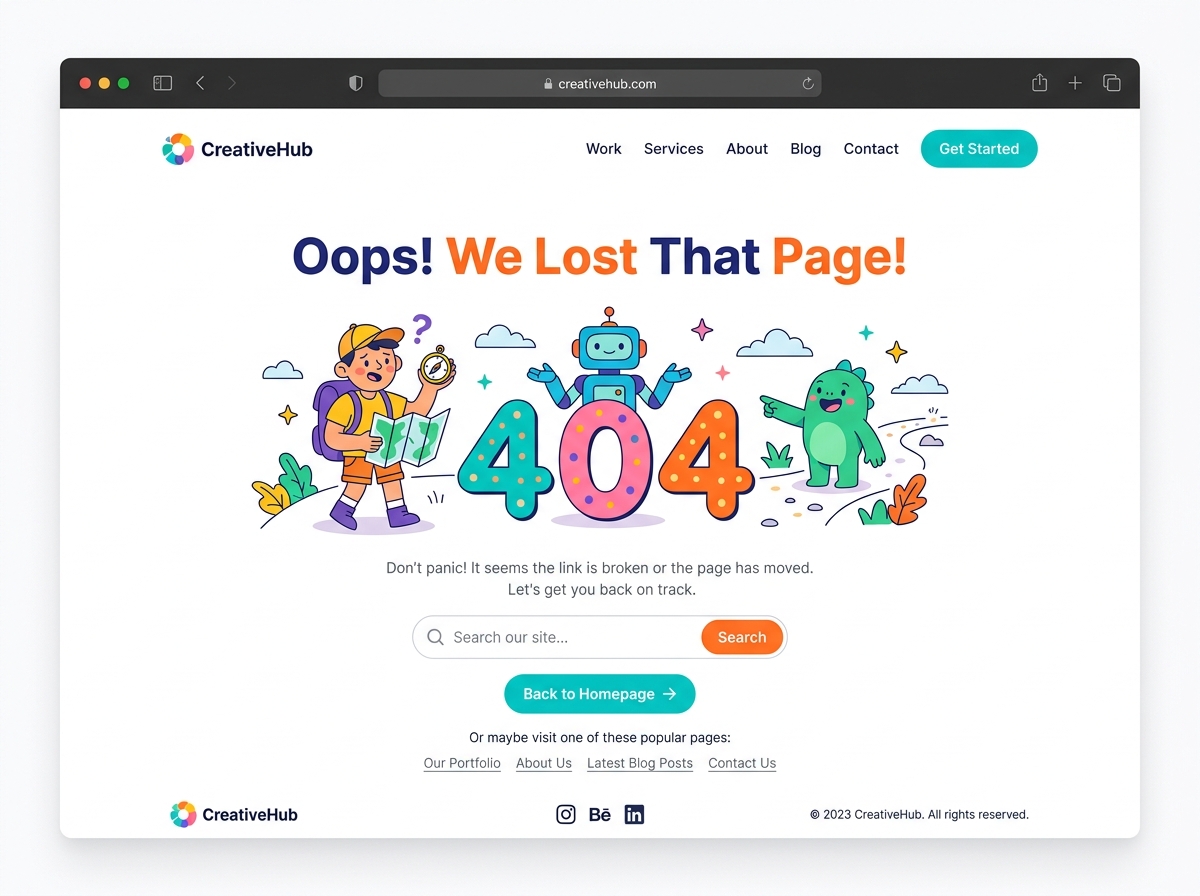
Why Your 404 Page Design Matters More Than You Think
Every website gets them — broken links, deleted pages, mistyped URLs. But what happens next is entirely up to you. A poorly designed error page sends visitors running straight to your competitors. A well-crafted 404 page design, on the other hand, can keep users engaged, protect your search rankings, and even drive conversions. In this guide, we’ll walk through the best practices every business owner and digital marketer should follow to transform their error pages from dead ends into strategic assets.
What Is a 404 Error Page and Why Does It Happen?
A 404 error occurs when a user tries to access a page on your website that doesn’t exist. This can happen for several reasons:
- Deleted or moved pages that weren’t properly redirected
- Mistyped URLs entered directly into the browser
- Broken backlinks from external websites pointing to old content
- Internal links that haven’t been updated after a site restructure
While you can’t always prevent 404 errors from happening, you absolutely can control the experience users have when they encounter one. That’s where smart 404 page design comes in.
The SEO Impact of a Poor 404 Experience
Many website owners underestimate how 404 errors affect their SEO performance. When users land on a broken page and immediately leave, it signals to search engines that your site isn’t delivering value. High bounce rates from error pages can negatively influence how Google perceives your overall site quality.
Additionally, if crawl bots frequently encounter 404 errors, they waste your crawl budget — time that could be spent indexing your valuable content instead. A well-optimized 404 page design won’t fully replace a proper redirect strategy, but it significantly reduces the damage by keeping users on your site longer and guiding them toward relevant content.
Best Practices for Effective 404 Page Design
1. Keep Your Branding Consistent
Your error page should look and feel like the rest of your website. Use the same header, footer, color scheme, fonts, and logo. When users land on a 404 page that looks completely different from your site, it creates confusion and distrust. Consistent branding reassures visitors that they’re still in the right place — they just took a wrong turn.
2. Use Clear, Human-Friendly Language
Avoid technical jargon. Most visitors don’t know what “HTTP 404 Not Found” means, and they don’t need to. Instead, use friendly, conversational language that acknowledges the problem and immediately offers a solution. Something like “Oops! We can’t find that page — but here’s where you can go instead” is far more effective than a cold error code.
3. Include a Prominent Search Bar
One of the most powerful elements you can add to your 404 error page design is a functional search bar. If a user was looking for something specific, give them the tools to find it without leaving your site. This single feature can dramatically reduce your bounce rate and improve overall user experience.
4. Provide Helpful Navigation Links
Don’t leave visitors stranded. Include links to your most important pages, such as:
- Your homepage
- Popular blog posts or resources
- Product or service pages
- Your contact page
- A sitemap or category overview
The goal is to give users multiple clear paths forward so they can continue their journey on your site without frustration.
5. Add a Strong Call-to-Action
Your 404 page is a missed opportunity if it doesn’t include a call-to-action. Depending on your business goals, this could be an invitation to:
- Browse your latest products or services
- Sign up for your email newsletter
- Download a free resource or lead magnet
- Book a consultation or demo
Even a simple “Go Back to Homepage” button is better than nothing, but a targeted CTA aligned with your conversion goals is far more valuable.
6. Use Engaging Visuals or Humor (When Appropriate)
Some of the most memorable 404 pages use clever illustrations, animations, or light humor to turn a frustrating moment into a positive brand experience. Think of a playful graphic, a witty message, or even an interactive element. Just make sure the tone matches your brand voice — what works for a creative agency may not suit a financial services firm.
7. Make It Mobile-Responsive
With more than half of all web traffic coming from mobile devices, your 404 page design must be fully responsive. Test it across multiple screen sizes to ensure buttons are tappable, text is readable, and navigation links are easy to access on smaller screens.
8. Monitor and Fix 404 Errors Regularly
A great 404 page is a safety net — not a permanent solution. Use tools like Google Search Console, Screaming Frog, or Ahrefs to regularly audit your site for broken links and missing pages. When you find recurring 404 errors, set up proper 301 redirects to send users and search engines to the most relevant live page.
Examples of What Makes a Great 404 Page
The best-performing 404 pages share a few common traits. They load quickly, communicate clearly, offer immediate next steps, and reflect the brand’s personality. Whether you go minimalist or creative, the key is to prioritize the user’s experience above all else. A visitor who lands on your error page and finds it helpful is far more likely to stay, explore, and eventually convert.
Common 404 Page Design Mistakes to Avoid
- Displaying only the error code with no explanation or guidance
- Using a completely blank page with no branding or navigation
- Forgetting a back button or homepage link
- Slow loading times caused by heavy images or animations
- Ignoring mobile users with a desktop-only layout
Turn Your 404 Page Into a Conversion Opportunity
A thoughtfully designed 404 page is one of the easiest wins in website optimization. It requires minimal ongoing maintenance, yet it can meaningfully reduce bounce rates, improve user satisfaction, and even generate leads. Whether you’re redesigning your entire website or just looking for quick improvements, upgrading your error page is a smart, high-impact move.
If you’re ready to improve your website’s user experience from top to bottom — including those often-overlooked error pages — our team is here to help. Contact us today to learn how we can audit your site, fix broken links, and design a 404 page that works as hard as the rest of your website.