
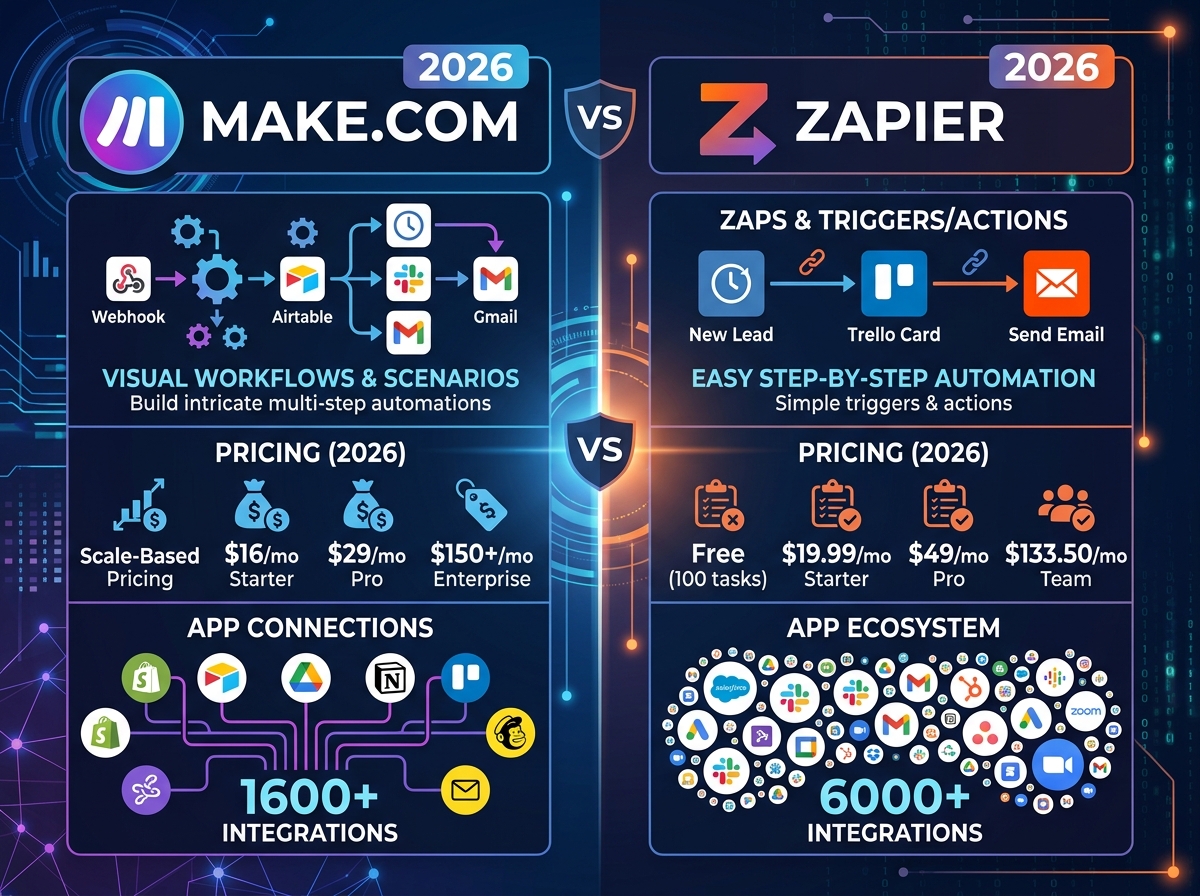
If you’ve been searching for the best way to automate your business workflows, you’ve probably already come across the Make.com vs Zapier 2026 debate. Both tools promise to save you time by connecting your apps and automating repetitive tasks — but they work very differently, and the wrong choice could cost you money or slow you down. In this post, we’re breaking down exactly what each platform offers so you can make the smartest decision for your business.
What Are Make.com and Zapier — And Why Do They Matter?
Both Make.com and Zapier are no-code automation platforms that let you connect apps like Gmail, Shopify, Slack, Google Sheets, and hundreds more — without writing a single line of code. Instead of manually copying data between tools or sending the same email every week, you set up an automated workflow that does it for you.
For small business owners and digital marketers, this is a game-changer. Automation frees up hours every week so you can focus on growing your business instead of managing it. The question isn’t whether you should automate — it’s which tool will do it best for your specific needs.
If you’re just getting started with automation, check out our beginner’s guide to Make.com automation for small businesses to see how it all works in practice.
Make.com vs Zapier 2026: Key Features Compared
Ease of Use
Zapier has long been known as the most beginner-friendly automation tool on the market. Its simple, linear “Zap” structure — trigger, then action — is easy to understand and quick to set up. If you need a basic automation running in under five minutes, Zapier delivers.
Make.com (formerly Integromat) takes a more visual approach. You build workflows on a canvas, connecting modules with lines and branches. It looks more complex at first, but once you get the hang of it, that visual layout actually makes it easier to manage complicated, multi-step automations. For business owners who want more control, Make.com’s interface becomes a real advantage.
Pricing in 2026
This is where the comparison gets really interesting. Zapier’s free plan is limited to 100 tasks per month and single-step Zaps only. Paid plans start at around $19.99/month, and costs can climb quickly as your task volume grows — especially if you’re running multiple workflows across a busy business.
Make.com offers a free plan with 1,000 operations per month, which is significantly more generous. Paid plans start at around $9/month, making it one of the most affordable automation tools available in 2026. For budget-conscious small businesses, Make.com often delivers far more value per dollar.
Integrations and App Connections
Zapier connects with over 6,000 apps, which is one of its biggest selling points. If you use a niche or lesser-known tool, there’s a good chance Zapier already supports it. Make.com connects with over 1,500 apps natively, but also supports custom API connections, which means you can connect to virtually any platform if you’re willing to do a little setup.
For most small businesses using popular tools like Google Workspace, Shopify, HubSpot, or social media platforms, both tools will cover everything you need. The app count difference rarely matters in day-to-day use.
Advanced Automation Capabilities
If your workflows are simple — like “when I get a new lead, add them to my email list” — Zapier handles this beautifully. But if you need conditional logic, data transformation, loops, or multi-branch workflows, Make.com is in a league of its own. It was built for complex automation from the ground up.
Make.com also gives you much more control over how data is processed and formatted within your workflows. For businesses that rely on detailed reporting, custom CRM updates, or multi-step client onboarding sequences, this flexibility is invaluable.
Which Tool Is Right for Your Business?
Choose Zapier If…
- You’re brand new to automation and want the simplest possible setup
- You need to connect a very niche app that only Zapier supports
- Your workflows are straightforward and single-step
- You prefer a polished, guided user experience
Choose Make.com If…
- You want more automation power for less money
- Your workflows involve multiple steps, conditions, or data manipulation
- You’re scaling your business and need automations that can grow with you
- You want to connect custom APIs or build advanced client workflows
- You’re working with a digital marketing agency that specializes in Make.com builds
For most small businesses and entrepreneurs we work with, Make.com wins the value comparison in 2026. The learning curve is real but manageable — and the payoff in time saved and workflow flexibility is well worth it. You can also explore real-world Make.com automation examples to see exactly how businesses like yours are using it today.
Getting the Most Out of Your Automation Tool
Whichever platform you choose, the biggest mistake business owners make is trying to automate everything at once. Start with your most repetitive, time-consuming task — whether that’s lead follow-up, social media posting, invoice generation, or client onboarding — and build from there.
It also helps to map out your workflow on paper before you build it digitally. Know your trigger (what starts the automation), your actions (what happens next), and your goal (what problem this solves). This simple planning step saves hours of troubleshooting later.
If you’re not sure where to start or want a custom automation built for your business, our team at LetsGetSocialOnline.com specializes in Make.com automation services for small businesses. We handle the technical setup so you can focus on what you do best.
- Zapier is easier for beginners but gets expensive fast as your task volume grows
- Make.com offers more operations on its free plan and significantly lower paid pricing
- For complex, multi-step workflows, Make.com is the more powerful choice in 2026
- Both tools cover the most popular app integrations — the difference is in depth, not breadth
- Starting small and scaling your automations gradually is the smartest approach for any business
The Make.com vs Zapier 2026 decision ultimately comes down to your budget, your workflow complexity, and how much time you’re willing to invest in learning a new tool. For growing businesses that want serious automation power without a serious price tag, Make.com is hard to beat.
Ready to start automating your business the smart way? Contact our team at LetsGetSocialOnline.com and let’s build a custom automation strategy that saves you time, reduces errors, and helps your business grow on autopilot.