
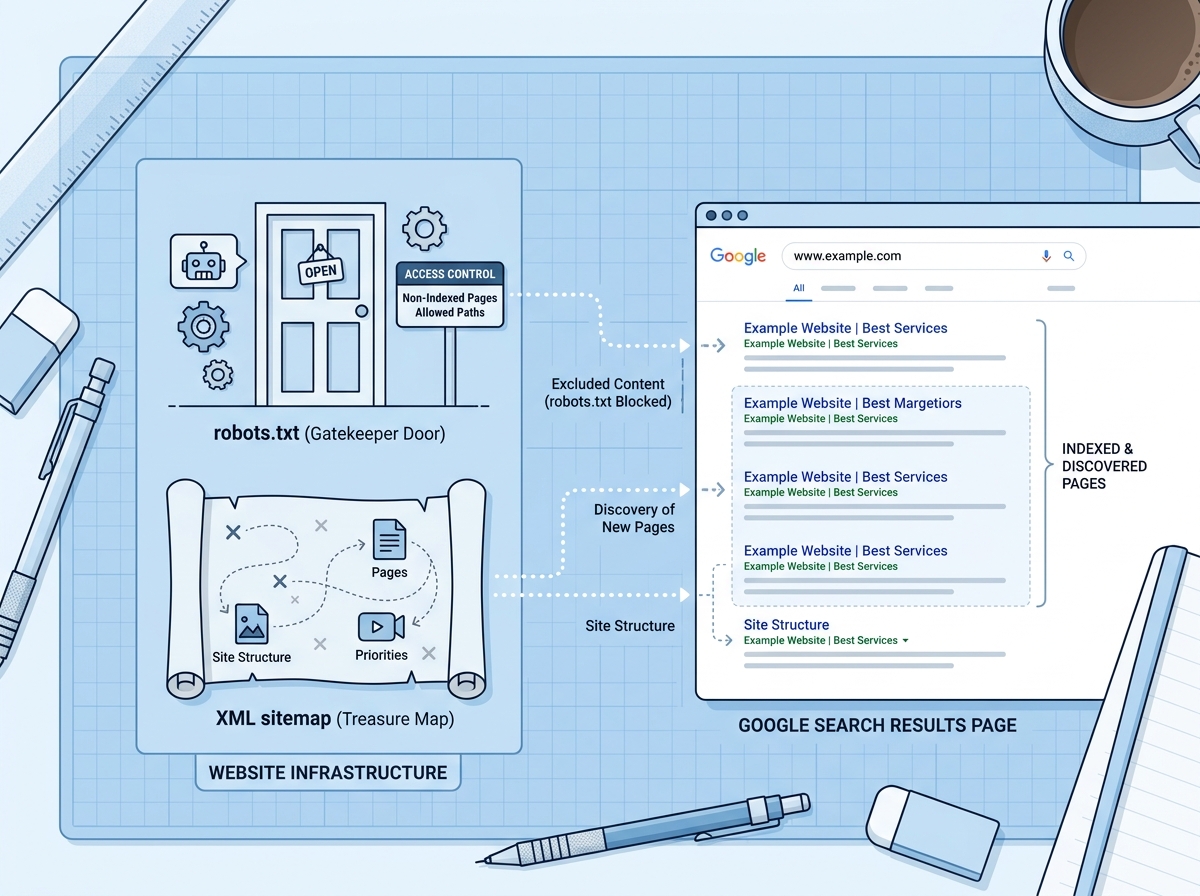
If you’ve ever peeked behind the curtain of your website and wondered what all those mysterious files do, you’re not alone. Two of the most misunderstood — yet incredibly important — pieces of your site’s SEO foundation are your robots.txt file and your XML sitemap. Understanding how the robots txt xml sitemap relationship works can make a real difference in how Google finds, reads, and ranks your content. Don’t worry — no coding degree required. Let’s break it all down in plain English.
What Is a Robots.txt File and Why Does It Matter?
Think of your robots.txt file as a set of instructions you leave at the front door for search engine bots — like Google’s Googlebot. It tells them which parts of your website they’re allowed to visit and which areas are off-limits. It’s a simple text file that lives at the root of your domain (for example: yourdomain.com/robots.txt).
What Can You Do With Robots.txt?
You can use your robots.txt file to block search engines from crawling pages that don’t need to be indexed — like admin dashboards, duplicate content pages, or staging environments. This helps protect sensitive areas and keeps crawlers focused on the pages that actually matter for your SEO.
- Block specific bots from accessing certain pages or directories
- Allow all bots to crawl your entire site freely
- Point bots to your XML sitemap so they know where to find your content
- Protect private pages like login portals or thank-you pages from being indexed
A common mistake business owners make is accidentally blocking important pages — or even their entire website — with a misconfigured robots.txt file. If Google can’t crawl your site, it can’t rank it. So it’s worth double-checking yours regularly.
What a Basic Robots.txt File Looks Like
Here’s a simple example of what a robots.txt file might contain:
User-agent: * (this means “all bots”)
Disallow: /admin/ (block the admin folder)
Sitemap: https://yourdomain.com/sitemap.xml (point to your sitemap)
That’s it. Clean, simple, and incredibly powerful when used correctly. Most website platforms like WordPress, Squarespace, and Shopify generate a robots.txt file automatically — but you should still review it to make sure it’s set up the way you want.
What Is an XML Sitemap and How Does It Help SEO?
If robots.txt is the gatekeeper, your XML sitemap is the map. It’s a file that lists all the important pages on your website and gives search engines a clear, organized path to follow. Instead of hoping Google stumbles across every page on your site, your sitemap hands them a complete directory — making it much easier and faster to get your content indexed.
What’s Included in an XML Sitemap?
Your XML sitemap typically includes the URLs of your most important pages, along with optional details like when each page was last updated and how frequently it changes. This helps search engines prioritize which pages to crawl first and how often to revisit them.
- Blog posts and articles you want ranked in search results
- Product and service pages that drive conversions
- Category and landing pages that support your site structure
- New content that hasn’t been discovered by Google yet
Your sitemap should not include pages you’ve blocked in robots.txt, redirected URLs, or low-quality duplicate pages. Keeping your sitemap clean and focused on your best content sends a strong signal to Google about what matters most on your site.
Where Do You Submit Your XML Sitemap?
Once your sitemap is created, you’ll want to submit it directly to Google Search Console and Bing Webmaster Tools. This tells search engines exactly where to find it and speeds up the indexing process — especially for new websites or freshly published content. You should also reference your sitemap URL inside your robots.txt file, which is a best practice that ties the whole robots txt xml sitemap system together neatly.
If you’re using WordPress, plugins like Yoast SEO or Rank Math will automatically generate and update your sitemap for you. Shopify and Squarespace also create sitemaps automatically. For custom-built sites, you may need a developer or a sitemap generator tool to create one. Learn more about how a full SEO audit can uncover technical issues like missing or broken sitemaps.
How Robots.txt and XML Sitemaps Work Together
Here’s where it all clicks: your robots txt xml sitemap setup works as a team. The robots.txt file controls access — telling bots where they can and can’t go. The XML sitemap provides direction — showing bots exactly where your valuable content lives. Together, they help search engines crawl your site more efficiently, which can positively impact your crawl budget and overall rankings.
Crawl budget refers to the number of pages Google will crawl on your site within a given timeframe. For larger websites, this matters a lot. By blocking unimportant pages with robots.txt and highlighting your best content in your sitemap, you’re essentially telling Google: “Spend your time here — this is what counts.”
Common Mistakes to Avoid
- Blocking pages in robots.txt that are listed in your sitemap (confusing mixed signals)
- Forgetting to update your sitemap when you publish new content
- Including noindex pages in your sitemap
- Never submitting your sitemap to Google Search Console
- Using a robots.txt file to “hide” pages instead of using proper noindex tags
These mistakes are more common than you’d think — and they can quietly hold your SEO back without you even realizing it. If you’re unsure whether your setup is correct, it’s worth getting a professional set of eyes on it. You can also explore our technical SEO services to see how we help businesses fix these foundational issues.
Do You Really Need Both Files?
Short answer: yes. Even if your website is small, having both a properly configured robots.txt file and an XML sitemap is considered a technical SEO best practice. It shows search engines that your site is well-organized and easy to navigate — which builds trust and supports better rankings over time.
The good news is that for most small business websites, setting these up correctly is a one-time task that pays dividends for years. Once they’re in place and submitted, they largely run in the background — quietly doing their job while you focus on growing your business. For a deeper dive into building a strong SEO foundation, check out our guide on SEO strategies for small businesses.
Key Takeaways
- Your robots.txt file controls which pages search engine bots can and cannot crawl.
- Your XML sitemap gives search engines a complete map of your most important pages.
- Together, the robots txt xml sitemap setup helps Google crawl your site more efficiently.
- Always submit your sitemap to Google Search Console to speed up indexing.
- Avoid conflicting signals — don’t block pages in robots.txt that you’ve listed in your sitemap.
Getting your technical SEO foundation right doesn’t have to be overwhelming. With the right setup, your robots.txt and XML sitemap work quietly in the background — helping Google understand your site and rank your content where it belongs. If you’re not sure whether your site is set up correctly, we’re here to help.
Ready to get your SEO foundation in order? Contact the team at LetsGetSocialOnline.com and let’s take a look at what’s holding your site back — and fix it together.