
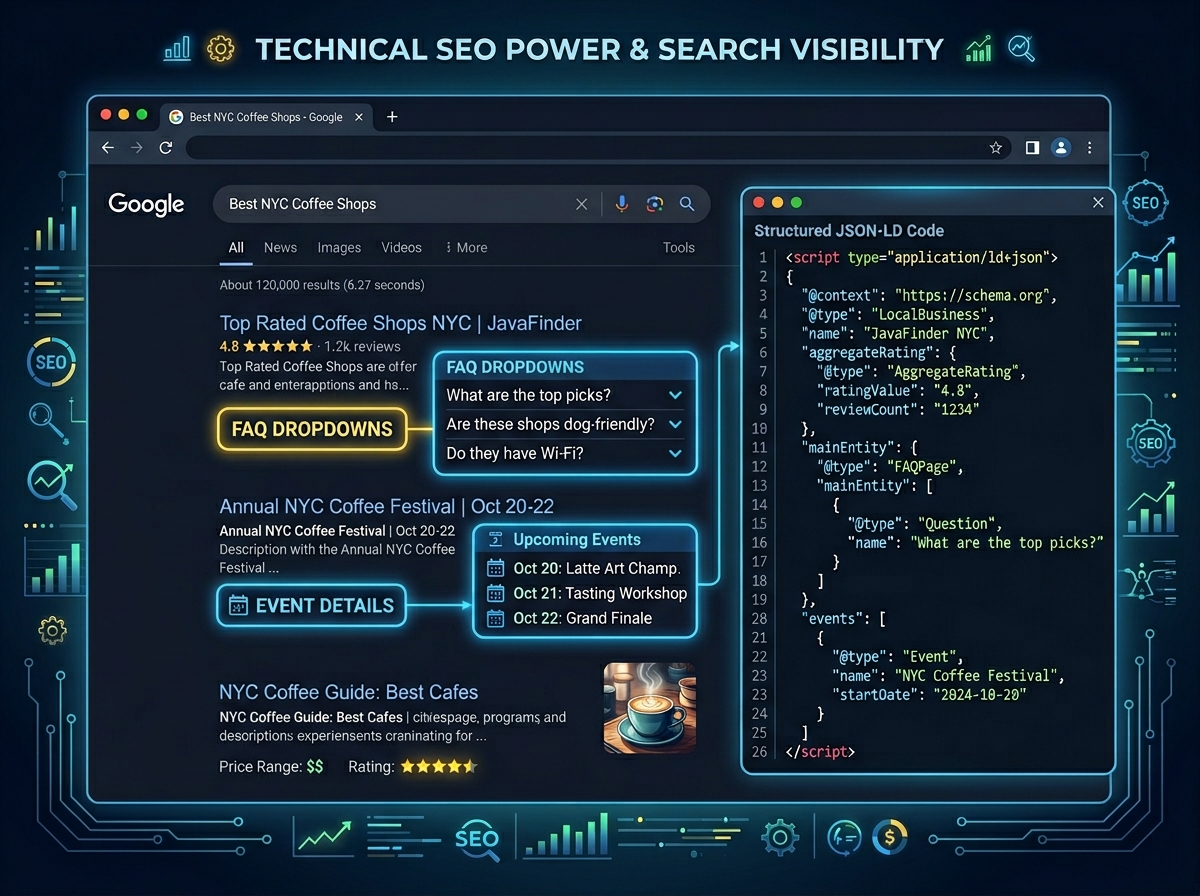
What Is Schema Markup and Why Does It Matter for SEO?
If you’ve ever searched Google and noticed star ratings, FAQs, or event details appearing directly in the search results, you’ve already seen schema markup SEO in action. Schema markup is a form of structured data — a special code you add to your website — that helps search engines understand your content more clearly and display it in richer, more engaging ways.
For business owners and digital marketers, this is a game-changer. When search engines like Google can better interpret your content, they reward you with rich snippets — enhanced search result listings that stand out from the competition, attract more clicks, and ultimately drive more qualified traffic to your site.
In this guide, we’ll break down exactly what schema markup is, how it works, and how you can start using it today to strengthen your SEO strategy.
How Schema Markup Works
Schema markup uses a standardized vocabulary from Schema.org — a collaborative project supported by Google, Bing, Yahoo, and Yandex. When you add schema code to your web pages, you’re essentially giving search engines a detailed “cheat sheet” about your content.
For example, instead of a search engine guessing that a page is about a recipe, schema markup explicitly tells it: “This is a recipe. It takes 30 minutes. It has 4.8 stars from 200 reviews. It contains 350 calories per serving.” That level of detail is what powers those eye-catching rich results you see in Google Search.
The Most Common Types of Schema Markup
- Article Schema – Ideal for blog posts and news articles, helping Google identify your content type and author information.
- Local Business Schema – Perfect for brick-and-mortar businesses, displaying your address, hours, phone number, and reviews directly in search results.
- Product Schema – Essential for e-commerce sites, showcasing product prices, availability, and star ratings.
- FAQ Schema – Allows your frequently asked questions to appear as expandable dropdowns directly in Google’s search results.
- Review Schema – Displays star ratings and review counts, building trust before a user even visits your site.
- Event Schema – Highlights event dates, locations, and ticket information in search results.
- How-To Schema – Breaks down step-by-step instructions in a visually rich format within search results.
Why Schema Markup SEO Is a Competitive Advantage
Here’s the truth: most websites still don’t use schema markup. That means implementing it correctly gives you an immediate edge over competitors who are leaving rich snippet opportunities on the table.
The benefits of schema markup SEO go well beyond aesthetics. Research consistently shows that rich snippets can increase click-through rates (CTR) by 20–30% or more. Higher CTR signals to Google that your content is relevant and valuable — which can indirectly improve your organic rankings over time.
Additionally, as voice search and AI-powered search experiences continue to grow, structured data becomes even more critical. Google’s AI overviews and featured snippets heavily rely on well-structured, clearly marked-up content to pull accurate answers.
How to Add Schema Markup to Your Website
There are three main formats for adding schema markup: JSON-LD, Microdata, and RDFa. Google strongly recommends JSON-LD because it’s the easiest to implement and maintain — it lives in a separate script tag rather than being embedded throughout your HTML.
Step 1: Choose the Right Schema Type
Start by identifying what type of content you want to mark up. Are you a local business? Use Local Business schema. Do you have a blog? Start with Article schema. Selling products? Product schema is your priority. Visit Schema.org to browse the full library of available types.
Step 2: Generate Your Schema Code
You don’t need to be a developer to create schema markup. Several free tools make it simple:
- Google’s Structured Data Markup Helper – A beginner-friendly tool that lets you tag elements on your page visually.
- Schema Markup Generator (TechnicalSEO.com) – A fast, form-based generator for multiple schema types.
- Rank Math or Yoast SEO (WordPress plugins) – If you’re on WordPress, these plugins can automatically generate schema markup for your pages and posts.
Step 3: Add the Code to Your Page
Once you’ve generated your JSON-LD code, paste it into the <head> section of your webpage, or just before the closing </body> tag. If you’re using a CMS like WordPress, your SEO plugin will handle placement automatically.
Step 4: Test and Validate Your Schema
Before going live, always validate your markup using Google’s Rich Results Test (search.google.com/test/rich-results). This tool shows you exactly which rich results your page is eligible for and flags any errors that need fixing. You can also use the Schema Markup Validator at validator.schema.org for a more technical review.
Common Schema Markup Mistakes to Avoid
- Marking up content that isn’t visible on the page – Google requires that schema markup reflects actual on-page content. Don’t mark up hidden or misleading information.
- Using the wrong schema type – Applying a Product schema to a blog post, for example, can confuse search engines and result in penalties.
- Ignoring validation errors – Even small syntax errors can prevent your rich snippets from appearing. Always test before publishing.
- Setting it and forgetting it – Schema markup needs to be updated when your content changes. Outdated structured data (like old prices or hours) can hurt your credibility.
Schema Markup SEO Best Practices for Long-Term Success
To get the most out of your schema markup SEO efforts, treat structured data as an ongoing part of your content strategy — not a one-time task. Here’s how to stay ahead:
- Prioritize high-impact pages first – Start with your homepage, top-performing blog posts, product pages, and contact/location pages.
- Monitor performance in Google Search Console – The Enhancements section shows which rich results are active and flags any issues.
- Combine schema types when appropriate – A local business can use both Local Business schema and FAQ schema on the same page for maximum visibility.
- Stay updated with Google’s guidelines – Google regularly updates what types of rich results it supports. Follow the Google Search Central Blog to stay informed.
Start Using Schema Markup to Elevate Your SEO Today
Implementing schema markup for SEO is one of the highest-ROI technical SEO strategies available to businesses of any size. It’s not just about ranking higher — it’s about owning more visual real estate in search results, building trust with potential customers before they even click, and future-proofing your site for the evolving search landscape.
Whether you’re a local business trying to stand out in your area, an e-commerce store looking to showcase products, or a content creator wanting your articles to shine, structured data gives you a powerful edge that most of your competitors are still ignoring.
Ready to take your SEO strategy to the next level? Explore our other guides on technical SEO best practices and local SEO strategies to build a complete, high-performing search presence. Or contact our team today for a free SEO audit and let us help you implement schema markup the right way.