
Website Accessibility: The Complete ADA Compliance Guide for Business Owners
If your business has a website — and it should — then website accessibility is no longer optional. It’s a legal requirement, a moral responsibility, and increasingly, a competitive advantage. With over 61 million adults in the United States living with some form of disability, an inaccessible website means you’re locking out a massive segment of potential customers. Worse, it could expose your business to costly lawsuits. This guide breaks down everything you need to know about ADA compliance and how to make your website work for everyone.
What Is Website Accessibility?
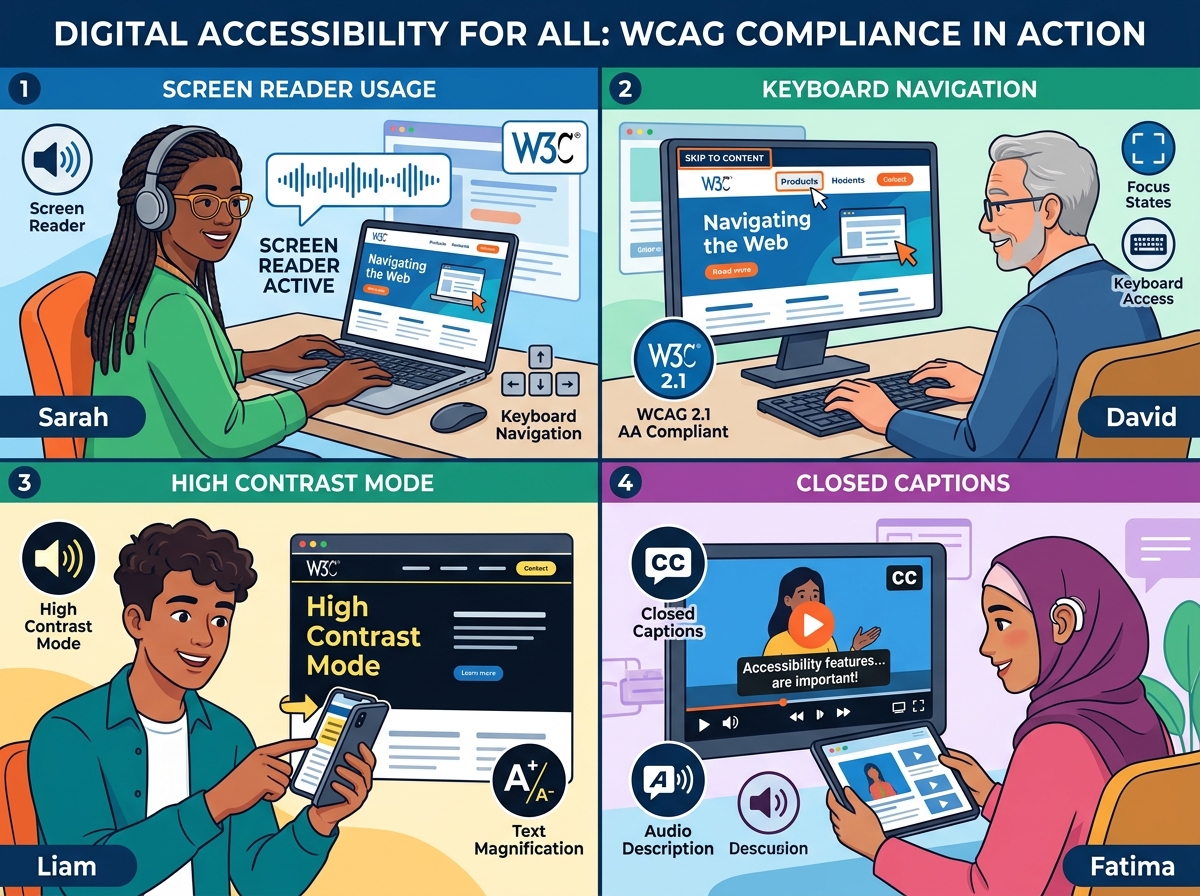
Website accessibility refers to the practice of designing and developing websites so that people with disabilities can use them effectively. This includes individuals with visual, auditory, motor, cognitive, and neurological disabilities. An accessible website ensures that all users — regardless of ability — can perceive, navigate, understand, and interact with your content.
Think of it like a physical storefront. Just as businesses are required to have wheelchair ramps and accessible restrooms, your digital storefront must be navigable for people using screen readers, keyboard-only navigation, or other assistive technologies.
Why ADA Compliance Matters for Your Business
Legal Risk and Lawsuits
The Americans with Disabilities Act (ADA) was signed into law in 1990, and courts have increasingly ruled that it applies to websites. In recent years, ADA-related website lawsuits have skyrocketed — with thousands of cases filed annually against businesses of all sizes. Retailers, restaurants, healthcare providers, and even small businesses have faced legal action. The cost of defending a lawsuit far outweighs the cost of making your site accessible in the first place.
Expanded Audience and Revenue
People with disabilities represent a combined spending power of over $490 billion in the U.S. alone. By improving website accessibility, you’re not just avoiding legal trouble — you’re opening your doors to a wider audience and increasing your potential revenue. Accessible websites also tend to perform better for elderly users, mobile users, and people in low-bandwidth environments.
SEO Benefits
Here’s a bonus most business owners don’t realize: accessibility improvements often align directly with SEO best practices. Alt text for images, proper heading structures, descriptive link text, and fast load times all benefit both screen reader users and search engine crawlers. Improving accessibility can give your search rankings a meaningful boost. If you want to learn more about how design and SEO work together, check out our guide on technical SEO best practices for business websites.
Understanding WCAG Guidelines
The gold standard for website accessibility is the Web Content Accessibility Guidelines (WCAG), developed by the World Wide Web Consortium (W3C). These guidelines are organized around four core principles, often remembered by the acronym POUR:
- Perceivable: Information and UI components must be presentable to users in ways they can perceive. This includes providing text alternatives for non-text content and captions for videos.
- Operable: Users must be able to operate the interface. All functionality should be available via keyboard, and users should have enough time to read and use content.
- Understandable: Information and operation of the UI must be understandable. Text should be readable, and pages should behave predictably.
- Robust: Content must be robust enough to be interpreted by a wide variety of user agents, including assistive technologies.
WCAG comes in three levels of conformance: A (minimum), AA (standard), and AAA (enhanced). Most legal standards and best practices recommend achieving WCAG 2.1 Level AA compliance.
Key Website Accessibility Requirements to Implement
1. Add Alt Text to All Images
Every image on your website should have descriptive alternative text (alt text) so screen readers can convey the image’s meaning to visually impaired users. Avoid generic descriptions like “image1.jpg” — be specific and descriptive.
2. Ensure Keyboard Navigation
Many users with motor disabilities rely entirely on a keyboard to navigate websites. Make sure all interactive elements — menus, buttons, forms, and links — are fully accessible without a mouse.
3. Use Proper Heading Structure
Organize your content with a logical heading hierarchy (H1, H2, H3). This helps screen reader users navigate your page efficiently and also improves your SEO structure.
4. Provide Captions and Transcripts for Media
Any video or audio content on your site should include captions or transcripts. This benefits users who are deaf or hard of hearing, as well as users in sound-sensitive environments.
5. Maintain Sufficient Color Contrast
Text must have enough contrast against its background to be readable by users with low vision or color blindness. WCAG recommends a contrast ratio of at least 4.5:1 for normal text.
6. Make Forms Accessible
All form fields should have clear, associated labels. Error messages should be descriptive and easy to understand. Avoid relying solely on color to indicate required fields or errors.
7. Include a Skip Navigation Link
A “skip to main content” link at the top of each page allows keyboard and screen reader users to bypass repetitive navigation menus and jump directly to the page’s primary content.
How to Audit Your Website for Accessibility
Not sure where your site currently stands? Start with a website accessibility audit. Here are some tools to help:
- WAVE (Web Accessibility Evaluation Tool): A free browser extension that visually highlights accessibility errors on any webpage.
- Google Lighthouse: Built into Chrome DevTools, it provides an accessibility score along with actionable recommendations.
- axe DevTools: A powerful browser extension used by developers to identify and fix accessibility issues.
- Screen Reader Testing: Test your site using NVDA (Windows) or VoiceOver (Mac/iOS) to experience it as a visually impaired user would.
For a thorough evaluation, consider hiring a professional accessibility consultant or working with a web design agency that specializes in compliant, inclusive design. You can also explore our website design services to see how we build accessibility into every project from the ground up.
Creating an Accessibility Statement
Once you’ve made improvements, publish an accessibility statement on your website. This page should outline your commitment to accessibility, the standards you’re working toward, any known limitations, and a contact method for users who encounter barriers. This demonstrates good faith and can be a factor in your favor if legal questions ever arise.
Accessibility Is an Ongoing Process
Achieving website accessibility isn’t a one-time task — it’s an ongoing commitment. As you add new content, update your design, or integrate new tools, accessibility must remain a priority. Schedule regular audits, train your content team on accessibility best practices, and stay current with evolving WCAG standards.
The businesses that treat accessibility as a core value — not just a compliance checkbox — are the ones that build stronger brands, broader audiences, and deeper customer trust.
Ready to Make Your Website Accessible?
Don’t wait for a lawsuit to take action. Whether you’re starting from scratch or improving an existing site, our team can help you build a fully accessible, ADA-compliant website that serves every visitor. Contact us today for a free website accessibility audit and take the first step toward a more inclusive — and legally protected — online presence.